
ENDA
Ad platforms for publishers

Let your ad campaigns see the bookings they create

If you buy traffic on Meta, TikTok or Google Ads, the platforms cannot see what happens after a reader clicks through to a travel agency. Kompare reports the journey, from search to confirmed booking, to your own ad accounts, so you can measure and tune your campaigns. Only for visitors who agreed to marketing on your site.

Join the waitlist as a publisher →

Kompare is in closed beta. No spam, we only reach out about early access.

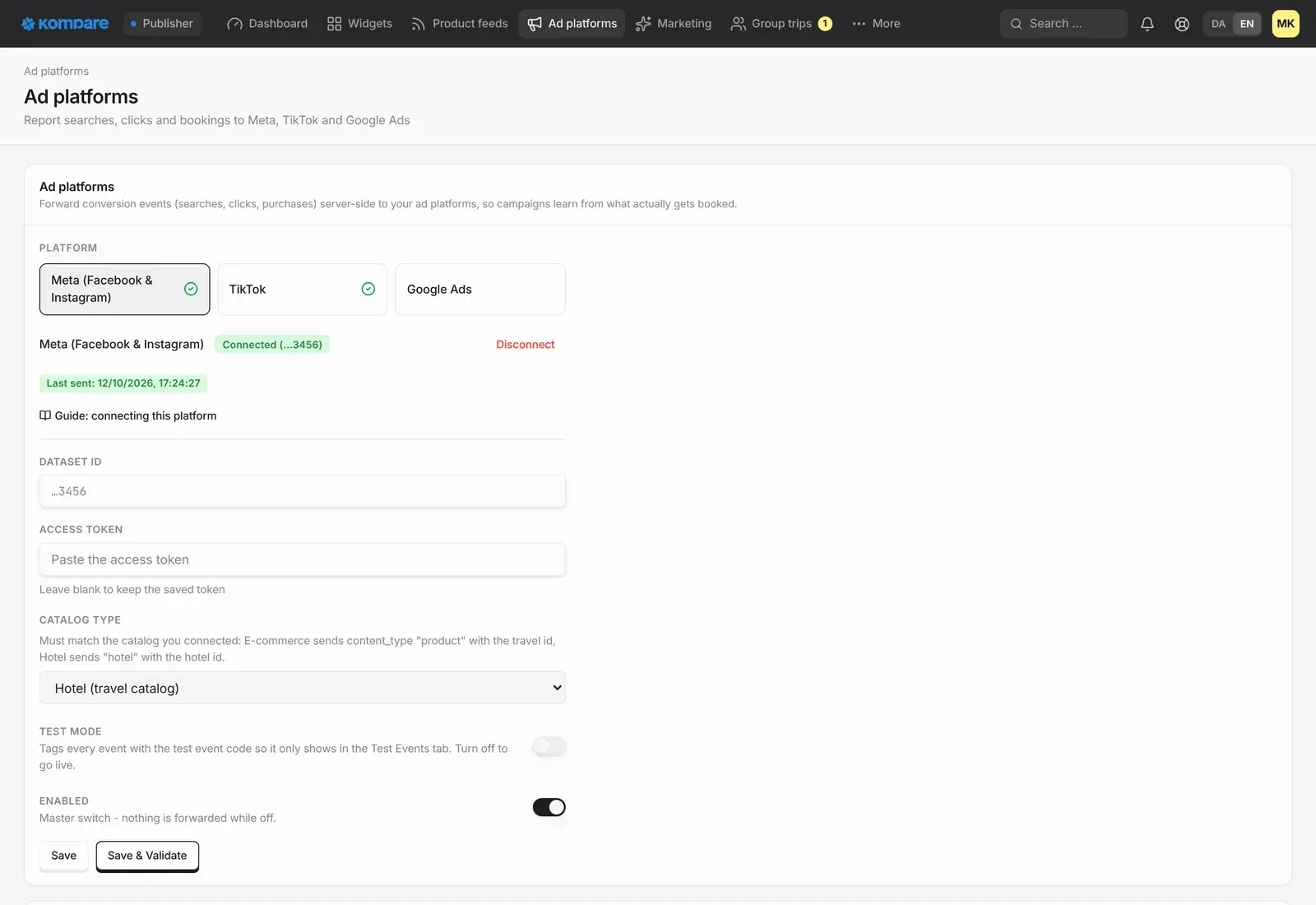
The Ad platforms page in the publisher console: Meta and TikTok connected and Google Ads available, with dataset id, catalogue type, test mode and a save and validate button.

Bookings back to your ad accounts

Searches, opened trips, clicks to the travel agency and confirmed bookings are sent to your Meta, TikTok or Google Ads account.

Valued at what you earn

A booking is reported with your commission as its value, so your campaign reports show what a booking is worth to you.

Only with consent

Events are sent only for visitors who gave marketing consent on your site. If consent is unknown, nothing is sent.

Nothing to install at the agency

Kompare sends the events from its own servers, so there is no pixel to place on the travel agency's site.

Test it, then check the log

Try the connection in test mode first. Afterwards a log shows for each event whether it reached the platform or was held back, and why.

What gets reported

Kompare follows a reader through your widgets and reports each step to the platform you connected. Events are sent from Kompare's servers, so you do not have to change anything on the travel agency's site.

  • Search: the reader searched for a trip
  • Trip opened: the reader looked at a specific trip
  • Click to the travel agency: the reader left to book
  • Checkout started: the reader opened the agency's checkout, where the agency's checkout start is set up
  • Purchase: the booking was confirmed

Consent comes first

Kompare reads the consent choice from your cookie banner, including the common consent tools and Google Consent Mode. It sends events only for visitors who have agreed to marketing. If a visitor has not chosen, or Kompare cannot tell, the answer counts as no and nothing is sent.

For visitors who did consent, events can include technical identifiers such as the IP address, which the platforms use to match an event to an ad click.

Google Ads needs the visitor to have arrived from one of its ads, so it receives events only for those visits. Meta and TikTok can also match other consenting visitors.

Connect, test and keep an eye on it

You connect each platform in your console. For Meta and TikTok you add details from your own account. For Google Ads you sign in with Google and choose a conversion action for each event.

In test mode Meta and TikTok show the events in their own test view, and validating the connection sends them a test event and shows you the result. For Google Ads, test mode and validation check the events without recording anything. The log then shows, for 7, 30 or 90 days, what happened to each event: it reached the platform, it was held back, or it needs your attention.

A Purchase is sent when the booking is confirmed, without waiting for the travel agency to approve it, and it is dated by the sale. Its value is your commission on the booking, not the price of the trip. Events are not withdrawn if a sale is later cancelled or disputed.

Kompare connects to these platforms but is not affiliated with or endorsed by them.

  • Held back: no marketing consent from the visitor
  • Held back: for Google Ads, the visitor did not come from one of its ads
  • Held back: the event is too old for the platform to accept
  • Held back: no conversion action chosen for that event
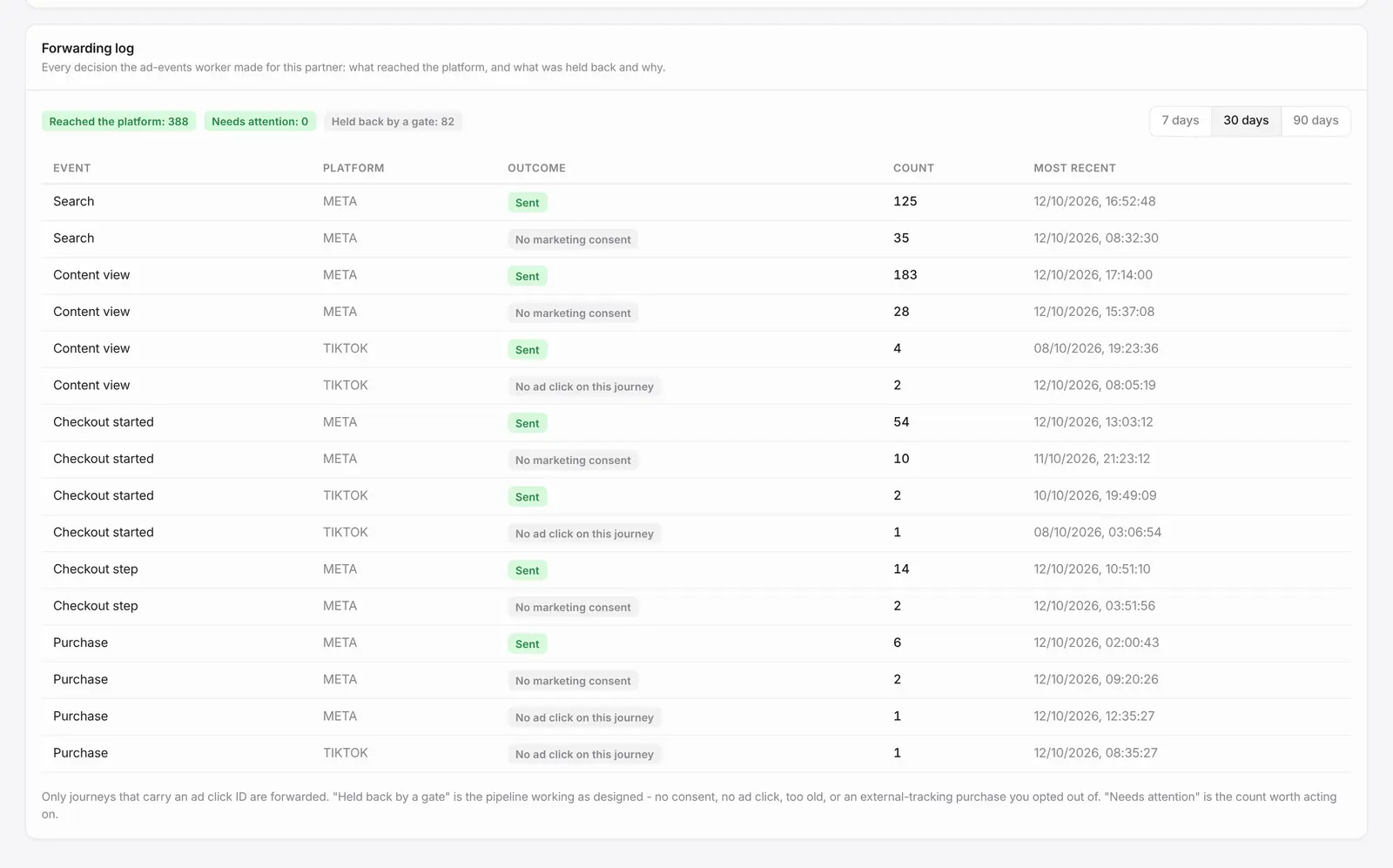
The forwarding log: each event type and platform with the number sent, and the number held back for no marketing consent or no ad click.
Example with made-up data.

How it works

  1. Join the waitlist

    Tell us about your site and the campaigns you run.

  2. Connect your ad account

    Add your Meta, TikTok or Google Ads details in your console.

  3. Test the connection

    Keep test mode on and validate the connection before you go live.

  4. Go live and follow the log

    See what reaches each platform and what was held back.

Frequently asked questions

Which visitors are included?

Only visitors who gave marketing consent on your site. If Kompare cannot tell whether a visitor consented, it counts as no and nothing is sent. For visitors who did consent, events can include technical identifiers such as an IP address, which the platform uses to match the event to an ad click.

What value does a Purchase carry?

Your commission on the booking, not the price of the trip. That way your campaign reports show what a booking is worth to you.

Will every booking show up in my ad account?

No. A booking is reported only if the visitor consented, and Google Ads also needs the visitor to have come from one of its ads. Checkout and Purchase events depend on what the travel agency's tracking reports. The platforms ignore events that are too old, and Meta may not credit a booking that is confirmed long after the click.

Can I test it before I rely on it?

Yes. In test mode Meta and TikTok show the events in their test view, and Google Ads checks them without recording anything. You can validate the connection from the console, and the log then shows what happened to each event.

Who can connect the ad accounts?

The owner of your Kompare account, from the console.

Related

Be first when we open up

Tell us about your business and we will reach out personally when we open up access.

Join the waitlist as a publisher →

Updated 5 November 2026