
ENDA
Product feeds

Turn trips into catalogue ads that refresh every night

A product feed turns a selection of trips into a catalogue for Meta, TikTok or Google Ads, or into a file you download yourself. It is rebuilt every night, its trips are checked again while it is built, and it can carry branded ad images. Product feeds are an add-on to Kompare.

Join the waitlist as a publisher →

Kompare is in closed beta. No spam, we only reach out about early access.

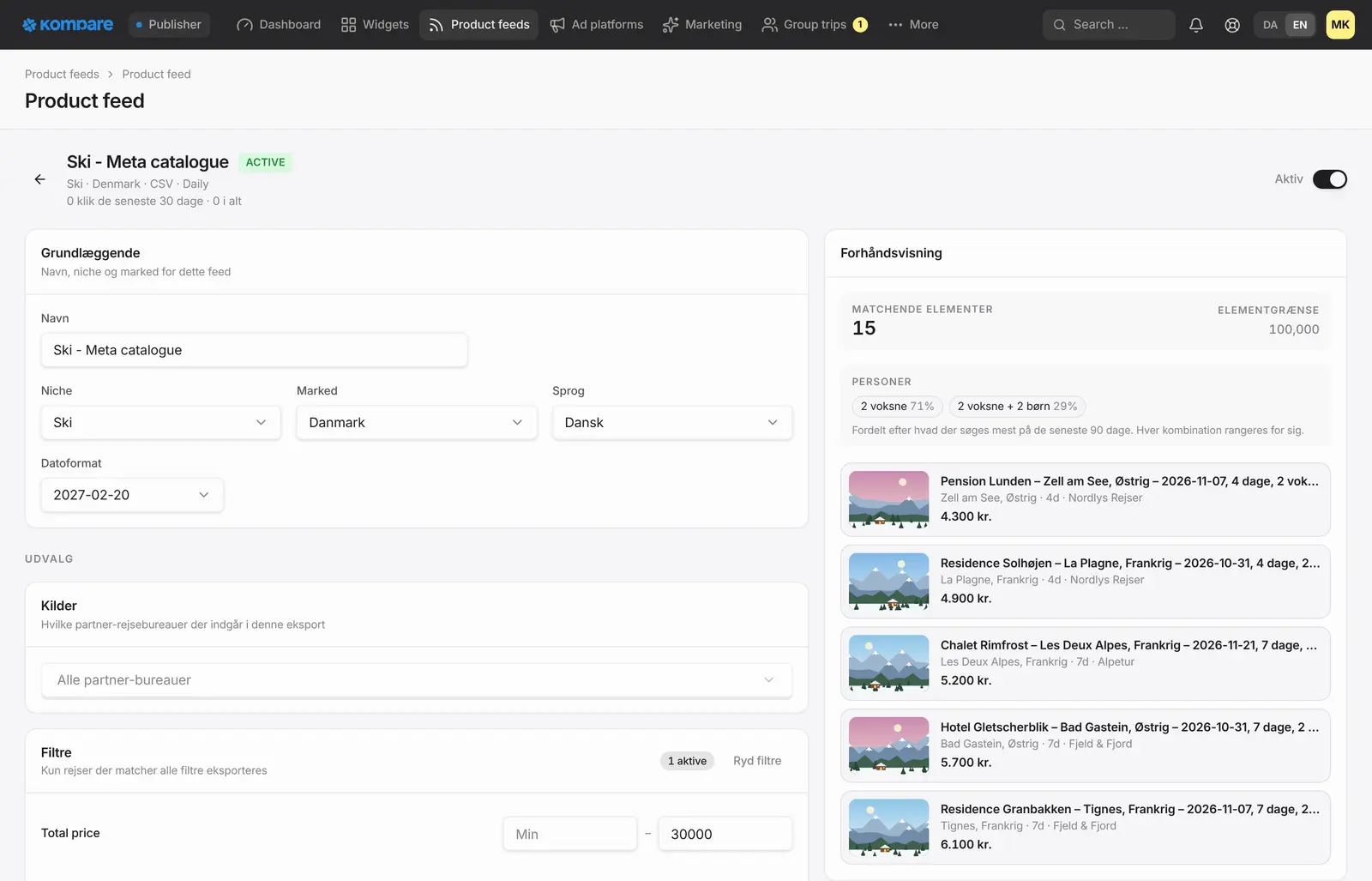
A product feed in the publisher console: name, niche, market, language and filters on the left, and a live preview of matching trips split by traveller group on the right.
Example with fictional travel agencies.

Meta, TikTok and Google Ads

Fill a catalogue on Meta or TikTok, or give Google Ads a feed to fetch. Prefer another tool? Download the file through a private link.

Rebuilt every night

Each feed is regenerated overnight, so your ads follow the latest trips and prices Kompare has collected. Weekly and monthly are available too.

Prices checked as the feed is built

Trips are checked again while a feed is built. A feed is a snapshot, not a live price list, so a price can still move afterwards.

Retargeting on trips visitors looked at

For publishers: trips your visitors opened or clicked can be kept in the catalogue, so a retargeting ad can show the trip they actually looked at.

Branded ad images

Design a template once. Every trip gets its own ad image with photo, price, rating, logo and destination, in several ad sizes.

Clicks that go where they should

For publishers, ad clicks go through Kompare and are attributed to you. For travel agencies, the feed links straight to your own site.

From trips to a running catalogue

You choose which trips go into a feed: niche, destinations, travel dates, price range and traveller mix. A feed can hold one item per trip or one per hotel, in Danish or English. Only trips from travel agencies that work with Kompare are included.

Kompare builds the file overnight. A run that finds no trips does not replace your last file, so a feed is never swapped for an empty one. You build and preview the feed in your console, then connect it to one or more ad channels.

  • Meta: once connected, Kompare registers the scheduled fetch in your catalogue, so the fresh file is picked up after each night run
  • TikTok: the same for your TikTok catalogue
  • Google Ads: you add the feed link once as a scheduled upload in Google
  • Any other tool: download the file through a private link, which you can replace whenever you like
  • Traveller groups: by default the items are shared across groups such as couples and families by what visitors search most, and every item names its group
  • Labels on every item, such as niche, country, destination, discount and duration, so you can build product sets in Meta

Retargeting and branded ad images

Publishers can keep the trips their visitors looked at in the catalogue. A visitor who opened a trip on your site can then be shown that same trip in an ad, and the catalogue holds the item to match it. Your ad account also needs to know what visitors looked at, which the ad platform conversions from Kompare report for you.

The template editor lets you design an ad image once. Each trip is drawn into it with its photo, price, rating, logo and destination, in Danish or English and in several ad sizes. Every ad built on a template feed carries the design of the template and the price of its own trip.
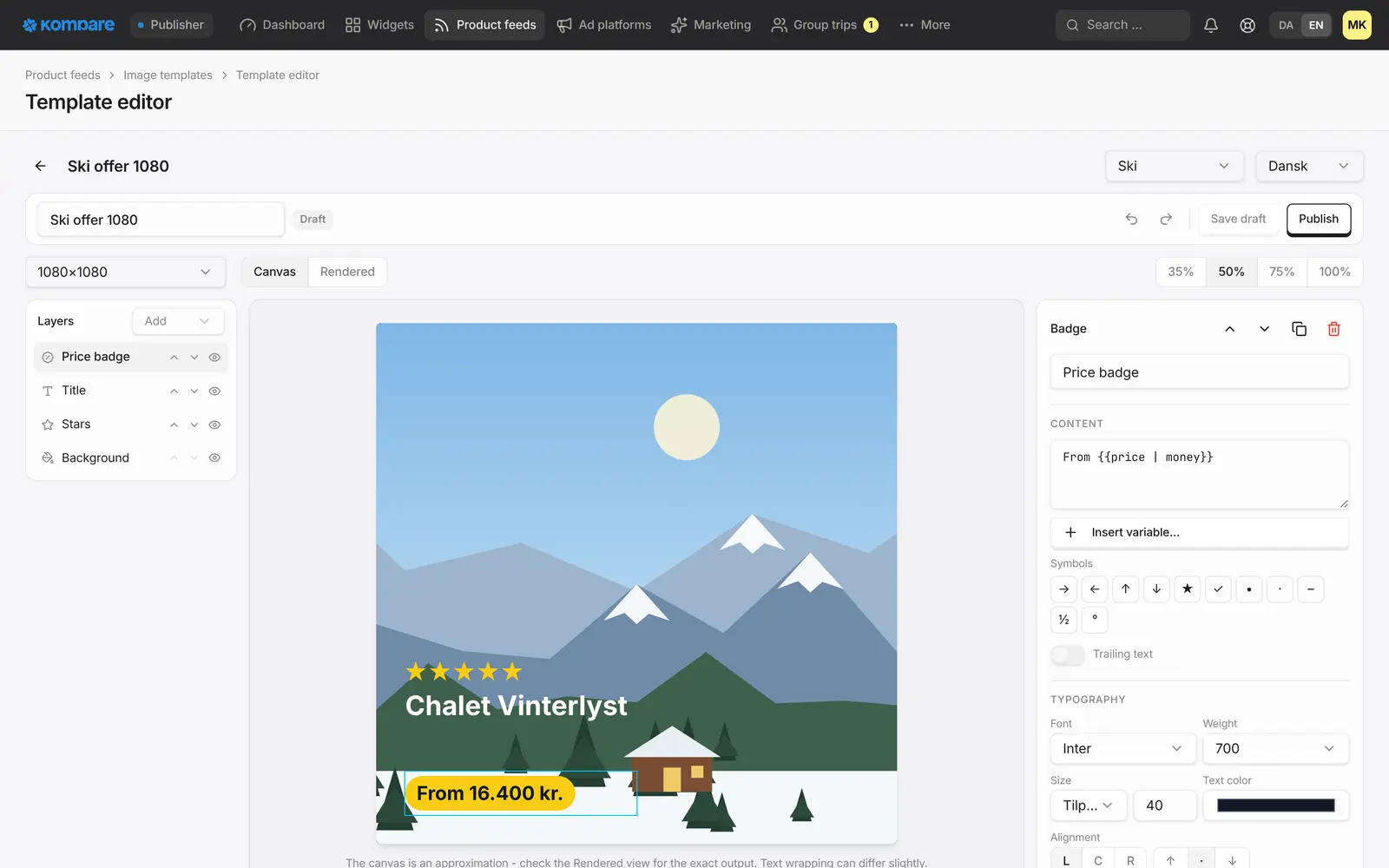
The ad image template editor: layers for price badge, title, stars and background, and a 1080 by 1080 ad image of a chalet with its price.

An add-on for publishers and travel agencies

Product feeds are an add-on, not part of the base platform. The branded ad image templates are an add-on as well. Publishers add them under Subscription in the console, and Kompare switches them on for travel agencies. Say that you are interested when you join the waitlist.

Publishers get feeds that link through Kompare, so every ad click is attributed to you, shows up in your analytics, and a booking that follows is tracked like any other sale. Travel agencies get feeds of their own trips that link straight to their own site, not through Kompare. You run the campaigns in your own ad account.

How it works

  1. Join the waitlist

    Tell us you want product feeds, and which niche you want to advertise.

  2. Build the feed

    Choose the trips, the language and the schedule, and preview what the feed will contain.

  3. Connect a channel

    Link your Meta or TikTok catalogue, or add the feed link in Google Ads.

  4. Run your campaigns

    Kompare refreshes the feed every night. You run the ads in your own account.

Frequently asked questions

Which channels are supported?

Meta, TikTok and Google Ads, plus a download link for any other tool. One feed can go to several channels at once, and each platform gets its own file in its own format.

Are the prices live?

No. A feed is rebuilt every night and the trips are checked again while it is built. A price can still change between publishing and the moment someone sees your ad.

Is every trip guaranteed an ad image?

In a feed that uses templates, a trip is included once its image has been drawn. If an image cannot be drawn, the trip is left out of that feed, so no ad runs without its price and branding.

Are product feeds included?

No. Product feeds are an add-on, and so are the branded ad image templates. Join the waitlist and tell us you are interested.

Where does an ad click go?

For publishers, through Kompare to the travel agency, so the click is attributed to you. For travel agencies, straight to their own site.

Related

Be first when we open up

Tell us about your business and we will reach out personally when we open up access.

Join the waitlist as a publisher →

Updated 5 November 2026