
ENDA
AI Article widget

Let every article show the trips it is about

Paste one snippet into an article. The widget reads the text around it, matches it to concrete trips that readers can book and shows them in a carousel. The trips link through Kompare, so the bookings are credited to you.

Join the waitlist as a publisher →

Kompare is in closed beta. No spam, we only reach out about early access.

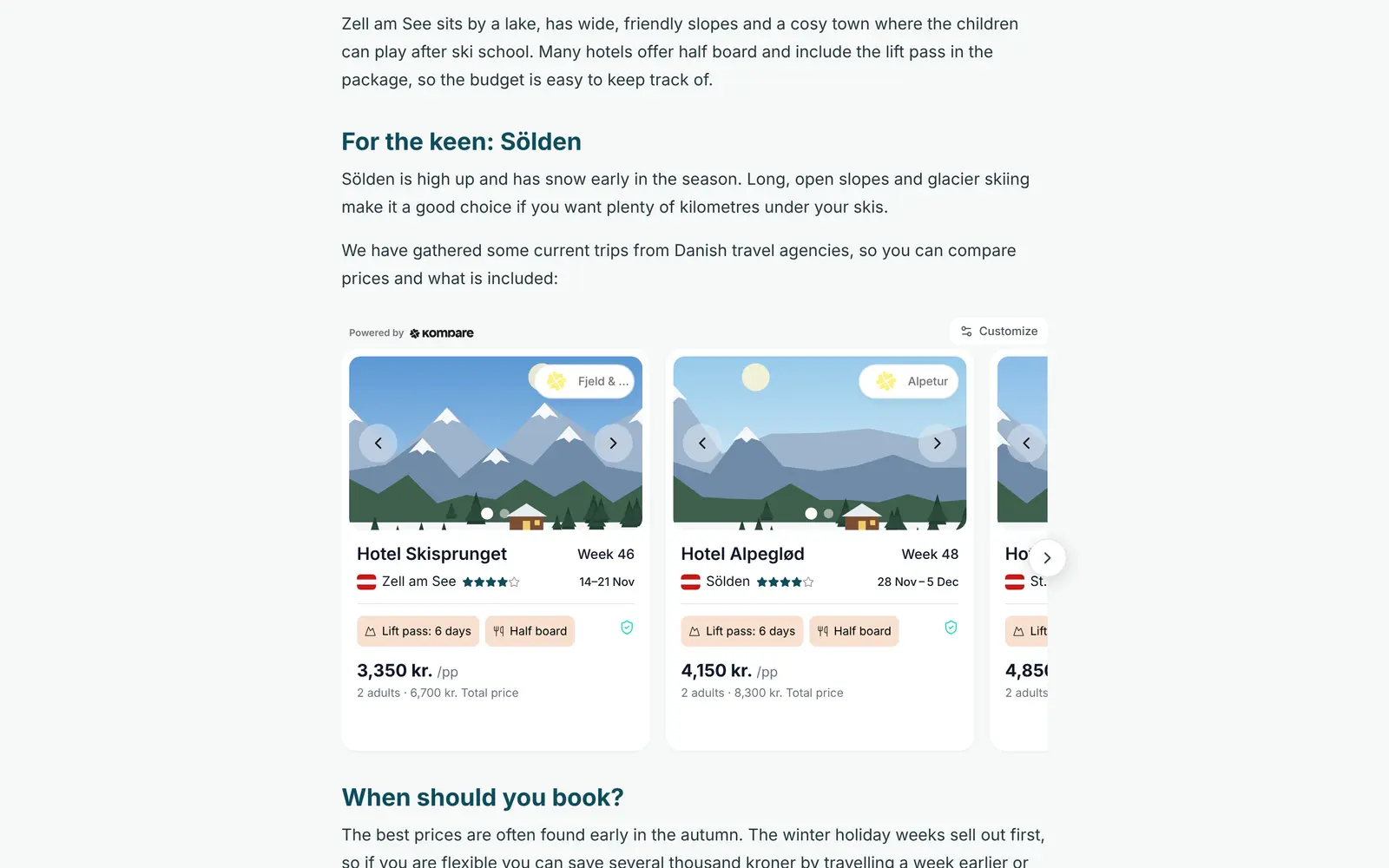
An article about ski resorts with the AI Article widget under a section on Sölden: a carousel of bookable trips with hotel, week, lift pass, board and price per person.
Example: a fictional ski magazine.

One snippet per article

Paste the same snippet into any article. The widget reads the text around it, so there is no search to set up for each one.

Trips that match the article

The widget matches on what the article says, such as the place, the season and the budget, and picks real trips from travel agencies that can be booked.

A carousel with more to find

Each card shows the hotel, the dates and the price per person. Readers can open more offers for the same hotel and load more trips.

On to your own results page

Set a results page and the last tile opens it with the search already filled in, so a reader who wants more carries on at your site.

Tracked and credited to you

Trips link through Kompare, so clicks and bookings are attributed to you. Bookings are followed where the travel agency has Kompare tracking.

Fixed filters when you want control

On a landing page you can skip the matching and pin the trips yourself, by place, travel agency, transport, trip length and price.

From article to bookable trips

You paste the snippet where the article should show trips, for example after the section about a destination. The widget reads the article text around it and works out a search from what the article is about: where, when, for whom and at what budget.

The result is a carousel of trips that fit the story. Readers can change the number of travellers and the travel months on the spot, and the carousel follows.

  • Hotel name, stars, destination and dates on every card
  • Price per person and for the whole party, with the normal price struck through when there is a discount
  • More offers for the same hotel, one tap away
  • Room to keep browsing, as the carousel can load more trips
  • Trips that can no longer be booked are hidden

Pin the selection when you want control

Matching on the text suits editorial articles. On a landing page you may want the same trips every time. Set fixed filters and the carousel shows exactly those trips, without reading the page. They are made for landing pages you fill from a CMS, such as one page per destination.

Readers can still change the number of travellers and the travel months. If you fix the transport or the trip length, those stay as you set them.

If you pin travel agencies and none of them can be shown, the carousel stays empty instead of filling up with others.

  • Countries and destinations
  • Travel agencies to include, or to leave out
  • Transport, including departure airport
  • Trip length in days, as single values or ranges
  • Ski pass included
  • A price ceiling per person
  • How the trips are sorted, for example by price, discount or stars
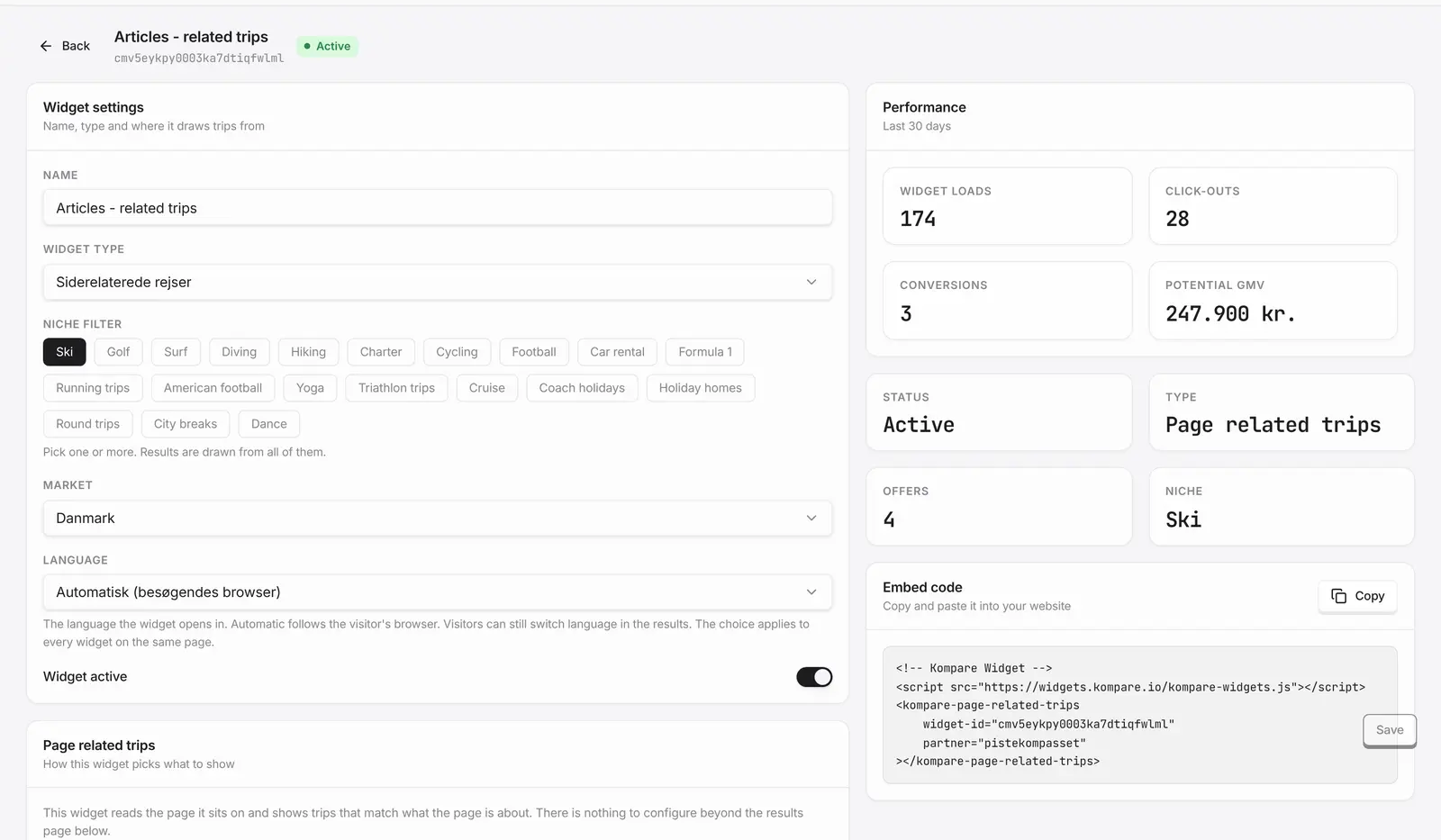
The AI Article widget's settings in the console: name, niche, market and language, with performance figures and the embed code to copy.

Shown where you allow it, measured per article

The widget runs only on the sites you have listed in your console. On any other site it shows nothing, so a copy of your article on another site does not end up with an error box.

In your dashboard the AI Article widget has its own journey, separate from your search widgets, from seeing the carousel to the booking. A table ranks the articles that carry it by page views, and you can narrow the journey down to single articles. Readers who continue to your results page carry on in the search journey.

How it works

  1. Join the waitlist

    Tell us about your site, your articles and your travel niche.

  2. Set up the widget

    Pick the niche and the results page that the carousel leads on to.

  3. Paste the snippet

    Copy the snippet from your console and paste it into an article.

  4. Follow the articles

    See page views and the reader journey per article in your dashboard.

Frequently asked questions

How does the widget know what an article is about?

It reads the text of the section it sits in, or of the article, and matches trips to what the text says. Like any AI, it can misread an article, and an article without a clear place or theme gets a broader selection in your niche. When you want control, use fixed filters.

Can I choose which trips it shows?

Yes. Set fixed filters for a landing page, such as countries, destinations, travel agencies, transport, trip length, ski pass and a price ceiling per person, and the carousel shows exactly those trips without reading the page.

Does it work in WordPress and other systems?

Yes. You paste the snippet into the article. In WordPress, use a custom HTML block, as a normal text block removes it. It also works in Webflow and in sites built with React or Vue.

Which sites can show it?

Only the sites you have listed in your console. A main domain also covers its subdomains. Anywhere else the widget shows nothing.

Is the AI Article widget included?

No, it is an add-on to Kompare's other widgets. Ask us about it when you get in touch.

Related

Be first when we open up

Tell us about your business and we will reach out personally when we open up access.

Join the waitlist as a publisher →

Updated 12 October 2026